

 WordPress
Order Prep Pro
Prepare your orders, effortlessly.
One app with everything you need to run your orders. Your WooCommerce orders picked on a phone or tablet, easily, so mistakes stop happening. Your daily sales figures within reach. Stock management simplified, right there in your pocket. And after-sales tied to your orders.
It works everywhere, on whatever device you already have in hand.
The app, screen by screen
Captured inside the app, in your language.
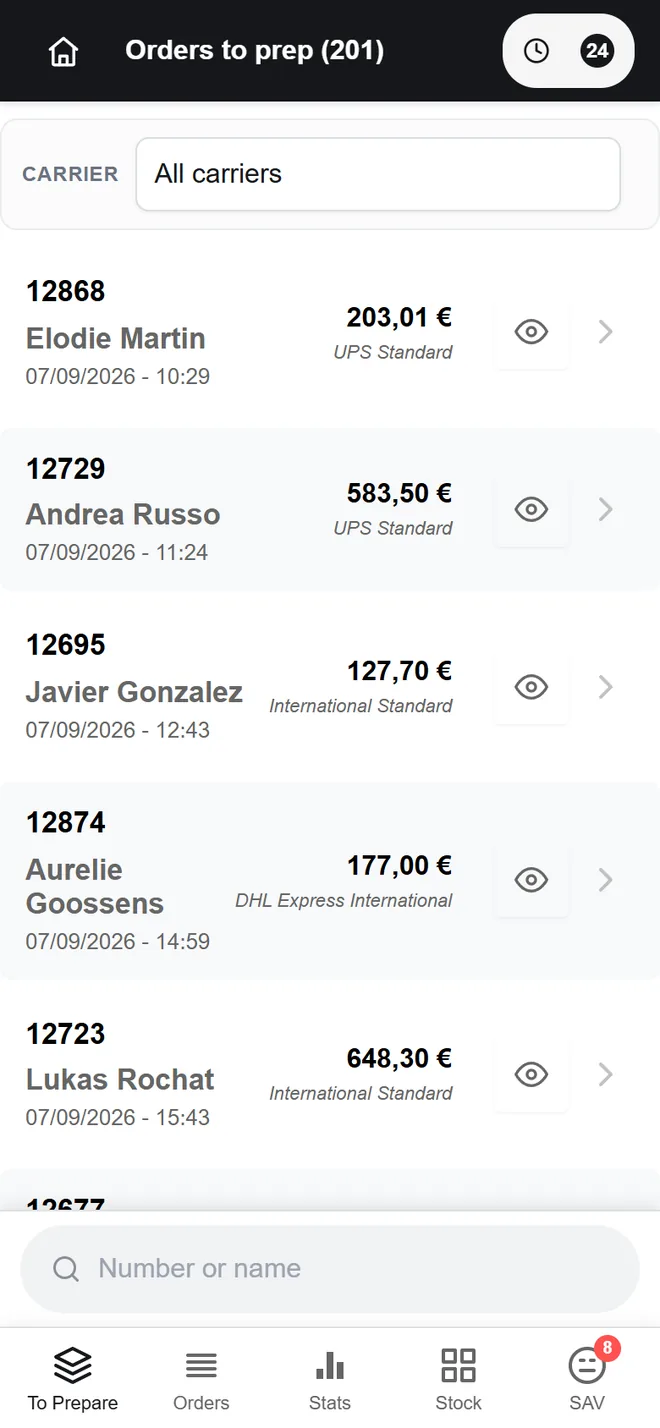
The picking queue, filtered by carrier and searchable by name
The problem
You pack your own orders, and the computer is in the other room. Opening the WooCommerce admin to find out what goes in the box takes a screen, a login and a lot of clicks for one simple answer. Your phone is already in your pocket: Order Prep Pro puts the picking list, today's sales and your stock in it. And the day someone gives you a hand, you open an account for them without handing over the keys to the shop.
An order, from end to end
What the app takes care of, and what stays with you.
How it gets set up
Install the plugin on your WooCommerce store and paste the licence key from your TrueLang account.
Create your team's accounts and tick what each person may reach: picking, stock, after-sales, statistics.
Each picker opens the app on their phone or tablet and installs it on their home screen.
Paid orders drop into the queue. They get picked, ticked off, completed, and the history stays there.
What the app holds
A real app on the tablet
Installable straight from the browser, with no app store in the way. Touch targets are sized for a finger and form fields do not trigger iOS auto-zoom. The touch layout applies to any finger-driven device, tablets included, not only to small screens.
The picking queue
Orders waiting to be picked, orders on hold, orders already done. Search by order number or customer name, with internal notes attached to the order. The app prints no shipping labels: you print yours as you always have, and it marks the order as shipped once the box is ready.
Stock
Check and adjust quantities from the same screen, with product search and category grouping.
After-sales
Open a case attached to an order, follow its history, resend an order. The exchange stays tied to the original order.
The team
Accounts that belong to the app, as many as you need: the licence covers the store, not the people and not the devices. Each person opens only what concerns them, picking for whoever packs, after-sales for whoever answers customers, the figures for you. Each person also picks their own language: your store can be in English while your picker works in Ukrainian. And whoever packs is not a WordPress user: they reach nothing else.
The numbers
Sales over the period you pick, and a monthly curve. Picking activity per person is read in the WordPress admin instead, on a screen reserved for the owner.
Who opens what
Three profiles, and the picker is set account by account.
| Section | Manager | Picker | Marketing |
|---|---|---|---|
| Order picking | |||
| History | |||
| Stock | |||
| After-sales | |||
| Statistics |
In detail
One licence, your whole team
The number of devices and people never counts: the licence covers your store. And if two people grab the same order, each one sees that the other is already on it.
What you are buying
A one-time payment, for one store. The key is issued by TrueLang and managed from your dashboard, next to your translation licences if you have any.
One key, locked onto the production domain that activates it
Development and staging environments are not counted
Updates included, downloaded from your dashboard
As many accounts as you want: nothing is counted per device or per user
Change your mind? Money back guarantee, thirty days.
If the app does not suit your team, you get a full refund. No conditions, no justification, no questions.
What you need before buying
A running WooCommerce store, and a free TrueLang account to hold the key. No translation plan is required: Order Prep Pro is sold on its own.
Equip your team
One store, one key, as many users as you need. You collect the key and the plugin file from your TrueLang dashboard.